Empty miles are the miles a driver drives from the last delivery of the previous load to the first pickup of this load. When the driver was somewhere else, for example after a recovery or a repair, those miles would be wrong. Reset Location lets you say where the empty miles really started, so you do not have to change the payroll by hand.
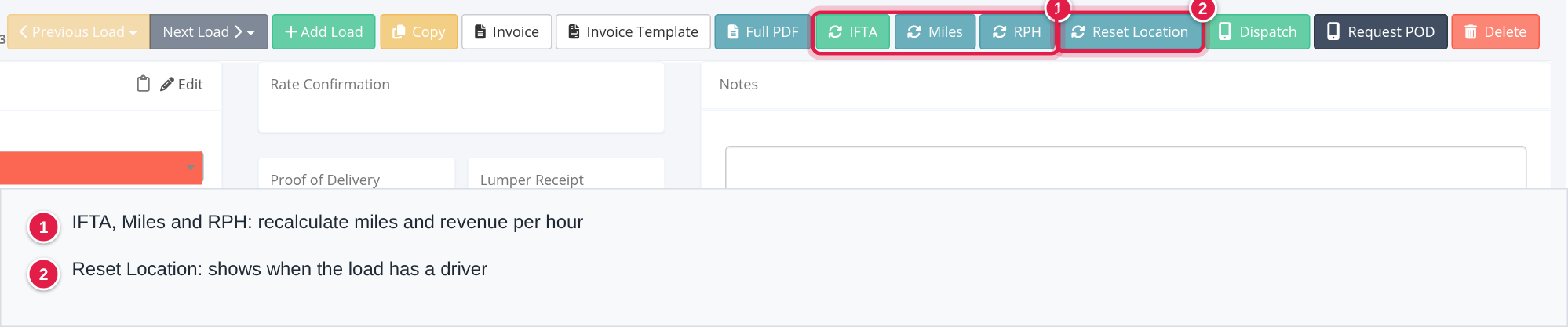
Who can do this: Reset Location shows for dispatcher and capacity users (or anyone given the permission), and only on a load that has at least one driver. The IFTA and Miles buttons show for dispatcher, capacity and accounting users. RPH needs the Miles permission and the permission for revenue per hour. Your administrator can change this for individual users.
Before you begin
- The load needs a driver. Without one there is no Reset Location button.
- Know the address where the driver really started and the date and time the driver was there.
- Open the load. The buttons are at the top right, in view mode and in edit mode. See Load profile: status, uploads, charges, stops, notes and Load Logs.
Reset the starting point of the empty miles
- Open the load and select Reset Location.
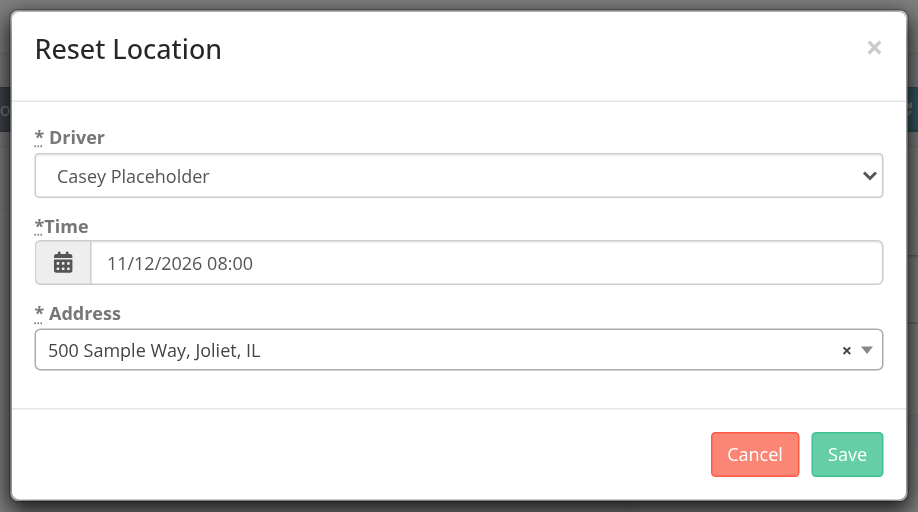
- In the Reset Location window fill in:
| Field | What to enter | Required |
|---|---|---|
| Driver | The driver of this load. The list shows the drivers on the load. | Yes |
| Time | The date and time the driver was at that address, as MM/DD/YYYY HH:mm. This is the local time at the address, not your own time zone. | Yes |
| Address | Type at least 3 letters and pick an address from the list (US and Canada). | Yes |
- Select Save. You see "Record saved successfully.".
What changes
- OpenRoad recalculates the empty miles in the background. The starting point is now the reset address instead of the previous load's last delivery. The end point is still the first pickup of this load for that driver.
- The new empty miles show on the load and feed the driver's statement and payroll.
- In the Stops panel, under that driver, you see Reset Address: and Reset Time:, for example "Reset Time: 2026-11-12 08:00:00 EST".
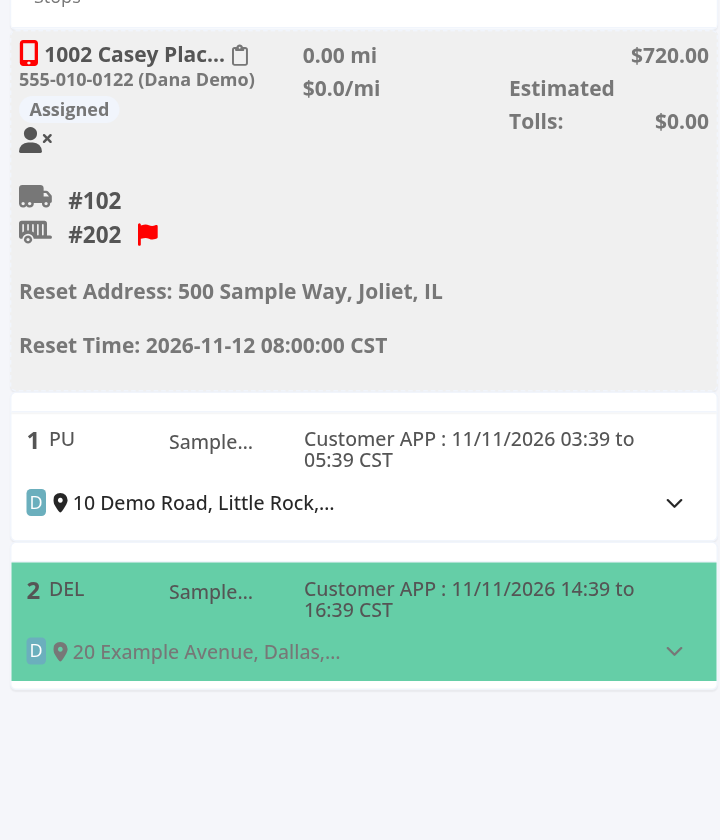
- A reset belongs to one driver on one load. A load with two drivers can have one for each.
- You do not need to press Miles afterwards. Saving does the same recalculation.
Correct a wrong reset
Open Reset Location again, choose the same driver, enter the right time and address and select Save. The newest reset for that driver on that load is the one used, and the miles are recalculated. There is no button to remove a reset.
The IFTA, Miles and RPH buttons
These buttons sit next to Reset Location. They do not ask for confirmation.
| Button | What it does | Message |
|---|---|---|
| IFTA | Recalculates only the miles per state, loaded and empty. It does not change the load's miles or the empty miles. | "Data is currently being reloaded per your request. Thank you for patience." |
| Miles | Recalculates everything: the empty miles (including a reset), the loaded miles of the route and the miles per state. A load with fewer than two stops is skipped. | The same message. |
| RPH | Recalculates the Revenue Per Hour for this load, for each driver on it. | "Revenue Per Hour has been recalculated for this load." |
The calculation runs in the background, so the new numbers can take a short time to appear. Refresh the page.
FAQ
Was this article helpful?
That’s Great!
Thank you for your feedback
Sorry! We couldn't be helpful
Thank you for your feedback
Feedback sent
We appreciate your effort and will try to fix the article