Automatic Detentions
Last Updated: November 2025
Overview
Automatic Detentions in OpenRoad TMS streamline how detention events are tracked, notified, and billed.
The system automatically detects detention events, sends time-based notifications to relevant parties, and syncs detention details for accounting and reporting.
This feature eliminates manual tracking, improves data accuracy, and ensures GP Transco receives detention compensation efficiently.
Purpose
To automate the detection, reporting, and documentation of detention events for GP loads, minimizing missed payments and ensuring transparent communication between dispatch, accounting, and customers.
Scope
This SOP applies to all GP-managed loads where:
- Trucks or trailers arrive at the shipper or receiver within the scheduled window.
- Detention time exceeds the 2-hour free waiting period.
- OpenRoad is integrated with Samsara for accurate arrival and departure timestamps.
System Workflow
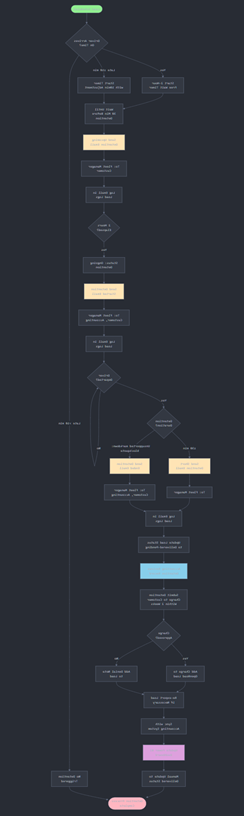
1. Detection Logic
- Detention automatically triggers 2 hours after the scheduled appointment time if the driver was on time.
- The system categorizes detention events as:
- Upcoming Detention: Within 30 minutes of starting.
- Ongoing Detention: Active detention clock.
- Completed Detention: Driver departed and load delivered.
- Drivers arriving up to 10 minutes late still trigger detention, but the start time in the email is adjusted by 10 minutes.
2. Email Notification Sequence
Notification Type | Trigger Timing | Description |
Upcoming Detention | 30 min before detention start | Pre-alert that detention is about to start. |
Detention Started | When detention begins | Confirms detention start and time details. |
Short Detention (≤30 min) | When detention ends within 30 minutes | Indicates a brief detention event. |
Detention Ended | Upon driver departure or load delivery | Provides summary with total detention time. |
Email Details
- Subject: Detention Notification – [Load #] – [Customer Name]
- Body includes:
- Driver name and truck/trailer number
- Customer and location details
- Appointment and actual times
- Detention start/end times
- Total detention duration and billed amount (if applicable)
- Direct link to the corresponding load in OpenRoad
- Sender: [GB1] System Email Address
- Excluded Recipients:[GB2]
- Accounting team always receives final detention summaries.[GB3]
3. Load Status Updates
- When a detained load is delivered, OpenRoad automatically updates the status to Delivered–Pending.
- User [GB4] can manually change this to Delivered after final confirmation.
4. Logging & Recordkeeping
- All automatic detention emails are recorded under Load → Logs section.
- “No Detention” statuses entered by users are visible in Load Notes[GB5] as a comment in Loads -> Notes.
- Cancelled detentions are automatically logged.
User Controls & Settings
Accessible under Settings → Preferences → Automatic Detentions
Configuration Options
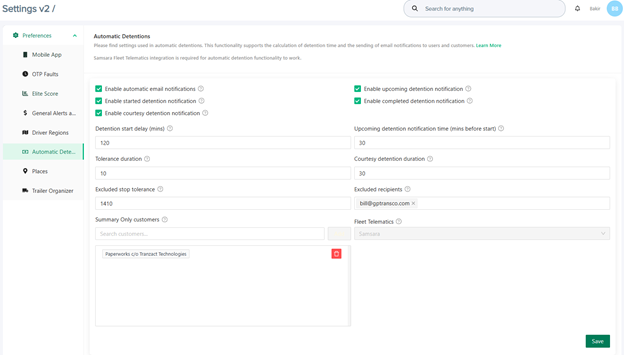
Notifications | Description |
Enable Automatic [GB6] Email | When enabled, the system will automatically send you an email if a detention occurs. |
Enable Started Detention | When enabled, the system will automatically send you an email if a detention occurs. |
Enable Courtesy Detention | Turn on/off courtesy email of detention which is sent if detention was shorter than 30 mins. |
Enable Upcoming Detention | Turn on/off email notification which is sent before start of detention calculation. |
Enable Completed Detention | Turn on/off email summary about completed detention. |
More Settings | Description |
Detention Start Delay | Enter the time in minutes after which the system should start calculating detention time. |
Tolerance Duration | Enter the period in minutes that is treated as Detention tolerance (time when detention is not calculated). |
Exclude Stop Tolerance | Enter excluded stop tolerance period in minutes. |
Summary Only Customers | For customers defined in this field, only summary emails will be sent. |
Upcoming detention notification time (mins before start) | Enter the time in minutes when the system should send an email notification of upcoming detention. |
Courtesy Detention Duration | Enter the period in minutes that is treated as Courtesy Detention duration. |
Excluded Recipients | Email recipients who will not receive detention notifications. |
Integration Requirements
- Samsara integration is required for real-time arrival/departure tracking.
- Customer contact emails must be stored in their OpenRoad customer profile, [GB7] under Overview -> Contact Info -> Automatic Detention E-mails, to receive notifications.
[GB1]This is GP specific. You will need to look into Jira or consult with Meile or somebody from devs who was recently doing any Jira ticket related to Detentions so they could explain logic which sender email will be visible if external customer will enable this feature on their account
[GB2]Please verify this as well. You will need to go automatic detention settings and see if we have such option to setup or this is GP only feature.
[GB3]This is GP specific. Would remove from SOP but would leave in full documentation version in Confluence
[GB4]Suggest to keep this neutral - just User
[GB5]This requires elaboration - where how and what to do see this load notes. Also term Planner might have total different meaning in every company so would go with ‘User’
[GB6]Suggest to keep ‘original’ titles used in the system and in the screenshot above so it would be easier for user to map text and visuals. Example could be ‘Start Delay” here and “Tolerance Duration” in Open Road. Also even it might sound clear for you we need to define every box and field in the settings so no open questions left users.
[GB7]Add bit more details - in which field as we have multiple fields for email settings under the customer
Was this article helpful?
That’s Great!
Thank you for your feedback
Sorry! We couldn't be helpful
Thank you for your feedback
Feedback sent
We appreciate your effort and will try to fix the article