The Pilot integration imports your Pilot Flying J fuel price files into OpenRoad TMS automatically. Your prices appear on the Daily Prices page and on the Pilot fuel stops of the load map, so your planners can choose fuel stops by price.
How It Works
- Pilot places your daily price file on its SFTP server, and OpenRoad imports it automatically.
- Prices are shown on the Pilot fuel stops loaded in your account. Pilot fuel stop locations are loaded into OpenRoad from a location file, so a price only shows on the map for a stop that exists in your account.
- Load Map Fuel Price decides which price the load map shows for Pilot stops:
- Default Formula: your price minus the state’s IFTA fuel tax rate.
- Target Pricing: the final price from the Target Pricing column of your file, shown as received. If a stop has no Target Pricing value, the map shows the Default Formula price.
What You Need to Send Us
- Your Pilot SFTP host, username, password and folder. Pilot issues them. Ask your Pilot representative for SFTP delivery of your daily fuel price file for your OpenRoad TMS integration.
- Which Load Map Fuel Price option you want. If you do not choose, we use Default Formula.
Important: Treat your SFTP password like any other password. Send it only to OpenRoad Support, and never post it in chat messages or tickets that other people can see.
Part 1: We Activate the Integration
Once we receive your credentials, our team enters them in Settings v2 → Integrations → Pilot, makes sure the Pilot fuel stop locations are loaded in your account, and activates the integration. We confirm by email when it is active.
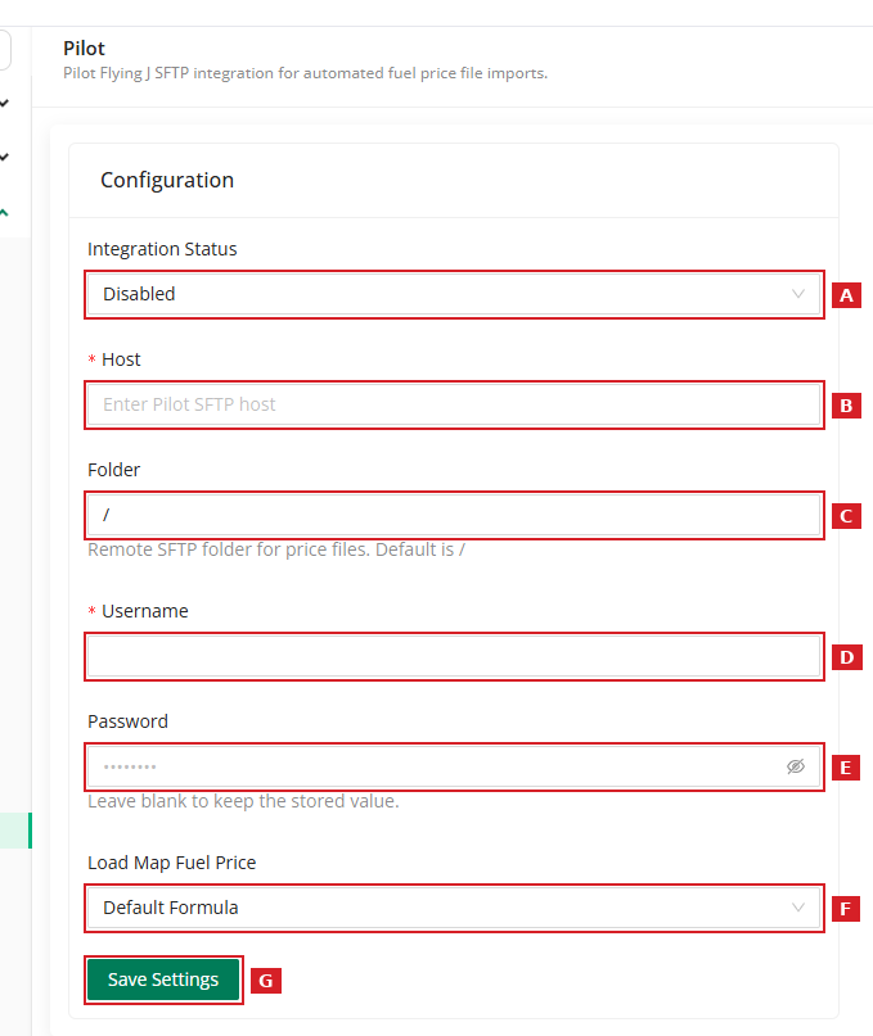
In this screen:
- A Integration Status: turns the integration on or off.
- B Host: the Pilot SFTP server.
- C Folder: where Pilot places your price files (default /).
- D Username.
- E Password.
- F Load Map Fuel Price: Default Formula or Target Pricing.
- G Save Settings.
Part 2: Check Your Prices
After the first file is imported, open Fuel Management → Daily Prices and the load map and check that your Pilot prices appear.
Frequently Asked Questions
Where do I see the prices?
On Fuel Management → Daily Prices, and on the Pilot fuel stops of the load map. Pilot prices are not fuel transactions, so they do not appear on the Fuel Transactions page.
Which price does the load map show?
It depends on the Load Map Fuel Price option: Default Formula (your price minus the state IFTA rate) or Target Pricing (the final price from your file).
Can I use Pilot and Love’s at the same time?
Yes. Each one has its own integration and its own credentials.
Was this article helpful?
That’s Great!
Thank you for your feedback
Sorry! We couldn't be helpful
Thank you for your feedback
Feedback sent
We appreciate your effort and will try to fix the article