MacroPoint is a tracking platform many brokers use to follow their loads. The MacroPoint integration sends the location of your loads to MacroPoint automatically, so your brokers see live tracking without your drivers accepting tracking requests or using the MacroPoint app.
How It Works
- Every 15 minutes, OpenRoad sends one position for each active load of a customer with MacroPoint turned on.
- The position comes from the GPS of the truck of the driver on the current stop, through your telematics integration (for example, Samsara).
- If the truck’s last GPS reading is older than 48 hours, no position is sent for that load.
- Each position is matched to the broker’s load by the broker’s MacroPoint ID and the customer load number.
What You Need to Send Us
- Your MacroPoint user (MPID) and password.
- The MacroPoint ID of each broker that wants to track you, and which customers in OpenRoad they are.
Note: Your truck GPS must already come into OpenRoad through your telematics integration. Without a recent GPS reading, no position can be sent.
Part 1: We Activate the Integration
Once we receive your MacroPoint details, our team enters them in Settings v2 → Integrations → Macropoint and notifies MacroPoint so they activate the connection on their side. We confirm by email when it is active.
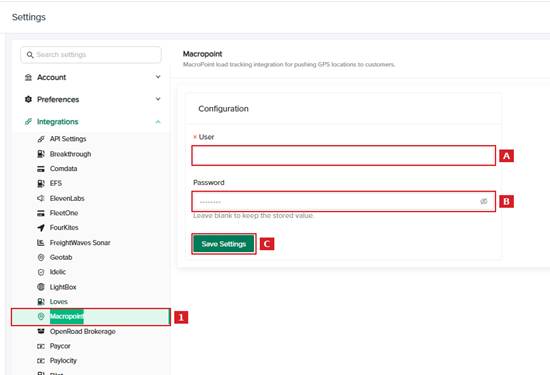
Part 2: Turn On MacroPoint for Each Customer
- Open the customer profile and go to Customer Info.
- Turn on Macropoint Integration and enter the broker’s Macropoint ID.
- Save the customer.
To see which customers have MacroPoint on, go to Customers, click Edit Columns and add the Macropoint integration column.
Important: The broker must accept location updates from your MacroPoint ID on their side. If a broker does not see your tracking, ask them to confirm it.
Frequently Asked Questions
Do my drivers need the MacroPoint app?
No. Positions are sent from your truck GPS. Drivers do not need to accept anything.
How often is the location sent?
Every 15 minutes for each active load of a customer with MacroPoint turned on.
A broker does not see tracking on a load. Why?
Check that MacroPoint is on in the customer profile with the correct Macropoint ID, that the customer load number matches the broker’s load, and that the truck has a recent GPS reading. Then ask the broker to confirm they accept updates from your MacroPoint ID.
Was this article helpful?
That’s Great!
Thank you for your feedback
Sorry! We couldn't be helpful
Thank you for your feedback
Feedback sent
We appreciate your effort and will try to fix the article