Connect FourKites to OpenRoad TMS and OpenRoad sends the position and delivery time of your customers' loads to FourKites automatically, so your customers can follow their freight in FourKites. You set up the connection once in Settings, then turn it on for each customer that wants tracking.
Who can do this: users who can open Settings → Integrations and edit customers.
Before you begin
- The FourKites feature must be switched on for your account. If you do not see FourKites under Settings → Integrations, or the FourKites Integration checkbox on a customer, contact OpenRoad Support at help@openroadtms.com.
- Ask your FourKites account representative for three values: your SCAC Code, an FTP Username and an FTP Password. An API Key is optional (see "Settings fields").
- Your trucks must be connected to Samsara. The position in every line OpenRoad sends is the last Samsara position of the truck on the load, so without Samsara OpenRoad has no position to send. See the article "Samsara Integration: Setup and How It Works".
- Your drivers must be assigned to the loads and the loads must have stops, because the position is taken from the stop the driver is driving to or standing at.
Part 1: Save your FourKites settings
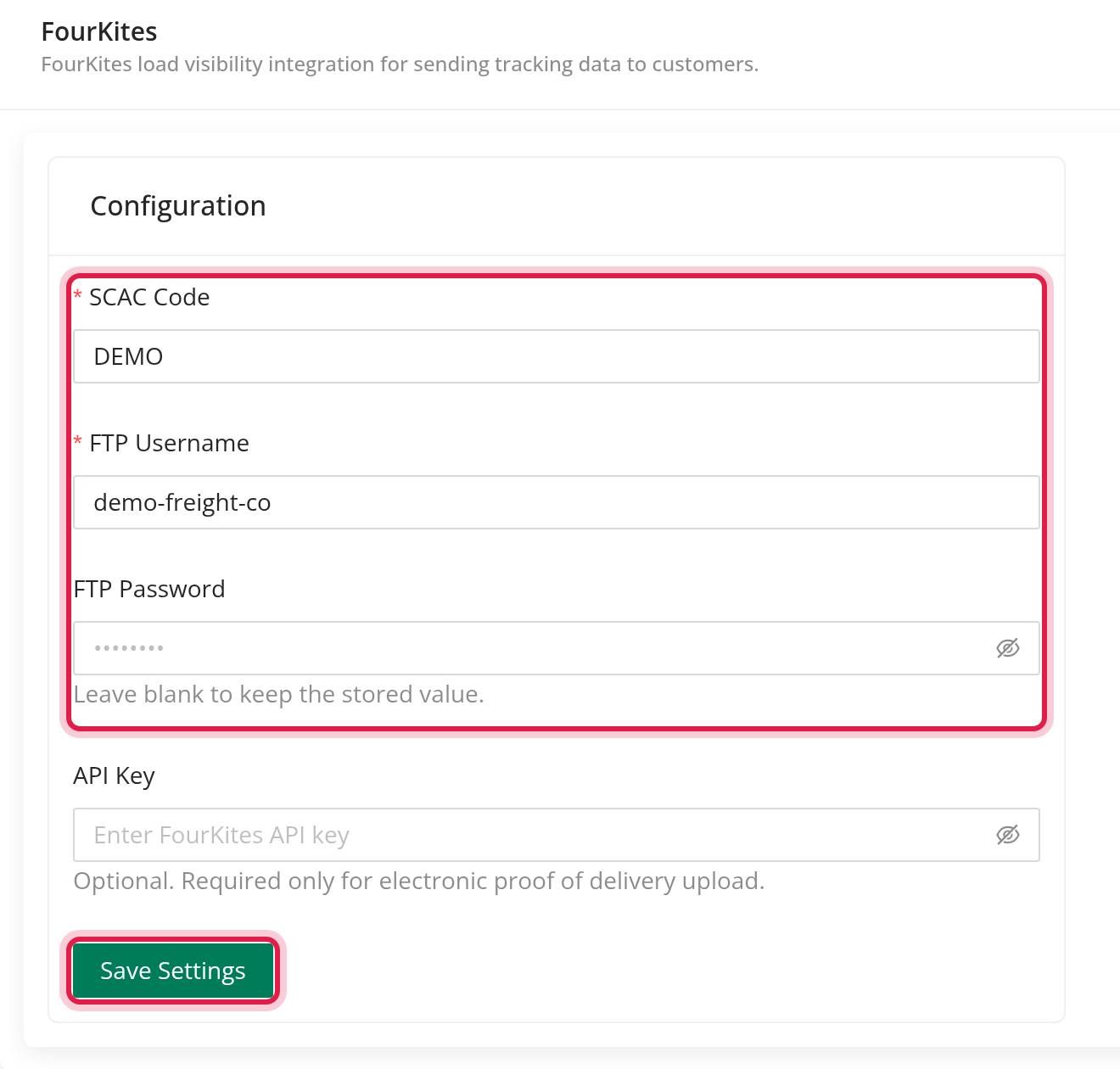
- Go to Settings → Integrations → FourKites.
- In the Configuration card fill in SCAC Code, FTP Username and FTP Password. These three are required.
- Click Save Settings.
Settings fields
| Field | Required | What it is |
|---|---|---|
| SCAC Code | Yes | Your carrier code. It is written in every line OpenRoad sends. |
| FTP Username | Yes | The login FourKites created for your file uploads. |
| FTP Password | Yes | The password for that login. |
| API Key | No | Needed only to upload electronic proof of delivery. |
Once a password or API key is saved, OpenRoad never shows it again. To replace it, type the new value and save. If you leave the field blank, the saved value stays.
The integration counts as on once the SCAC code, FTP username and FTP password are all filled in.
Part 2: Turn FourKites on for each customer
- Open the customer's profile and click Edit.
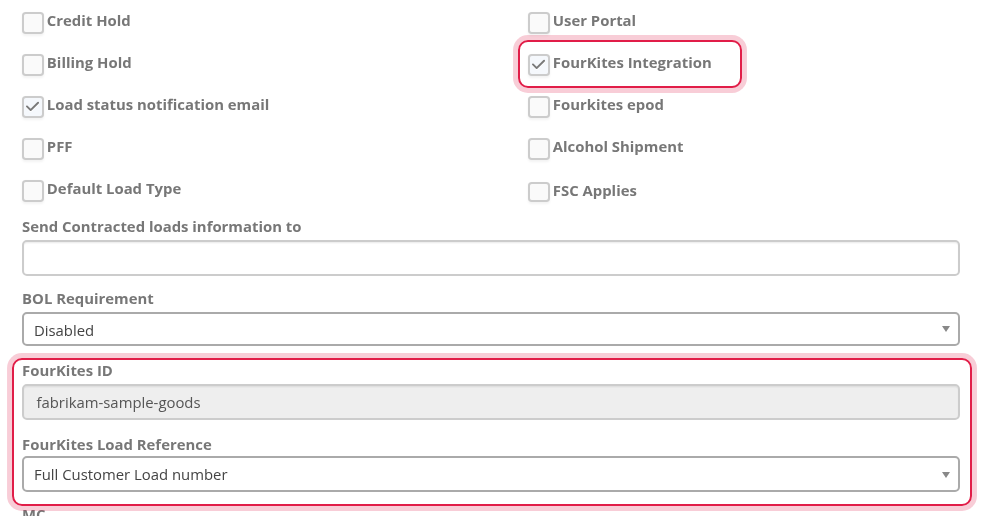
- Tick FourKites Integration.
- The FourKites ID field appears. It is filled in by OpenRoad and cannot be edited: it is the customer name in lower case with a dash in place of each space and punctuation mark, for example Sample Goods Co becomes sample-goods-co. If you rename the customer, this value changes with it.
- If the customer's load numbers contain a slash, choose the FourKites Load Reference (see below).
- Save the customer.
Only loads of customers with FourKites Integration ticked are sent.
FourKites Load Reference
This is the number FourKites uses to recognise the load. It comes from the Customer Load number of the load.
| Choice | What is sent |
|---|---|
| Full Customer Load number | The whole customer load number. |
| Part before slash (/) | The text before the slash. |
| Part after slash (/) | The text after the slash. |
The part choices apply only when the customer load number has exactly two non-empty parts around one slash, for example 1234/5678. Any other number is sent in full.
What OpenRoad sends
A file is built and uploaded every 15 minutes (at :00, :15, :30 and :45) with one line for each load that qualifies. A load is included when all of these are true:
- The load's customer has FourKites Integration ticked.
- OpenRoad has not yet sent the delivery of that load.
- The load status is one of En route to shipper, At shipper, Picked up, En route to consignee, At consignee (position updates) or Delivered / Delivered pending (the delivery time, sent once).
Loads in any other status, such as booked or assigned, are not sent. An in-transit load needs a driver who is driving to or standing at one of its stops.
Each line holds the customer's FourKites ID, the load reference, the truck's latitude, longitude, time, city and state from Samsara, the delivery time, your SCAC code, the stop number, and the earliest and latest appointment times. The file is uploaded over FTP to FourKites.
a load cannot be saved as Delivered for a FourKites customer unless the last stop has a Time Out. OpenRoad shows the message "Must be present for FourKites customers" with the stop number.
Frequently asked questions
Was this article helpful?
That’s Great!
Thank you for your feedback
Sorry! We couldn't be helpful
Thank you for your feedback
Feedback sent
We appreciate your effort and will try to fix the article