Connect OpenRoad TMS to Relay Payments and your Relay fuel transactions are imported automatically and shown on the Fuel Card Transactions page. With the API source you can also turn a driver's Relay fuel access on and off from the driver's profile.
Before you begin
- The Relay Fuel feature must be switched on for your account. If you do not see Relay Fuel under Settings → Integrations, contact OpenRoad Support at help@openroadtms.com.
- Only a Superadmin can open and save the Relay Fuel settings.
- Choose how Relay delivers your transactions:
- API: you need your Relay Fuel API Key. - SFTP: you need the Host, Username and Password of the SFTP site.
- To turn driver fuel access on from OpenRoad you need the API source, and your drivers must already exist in Relay. OpenRoad never creates a Relay driver.
Part 1: Connect Relay Fuel
- Go to Settings → Integrations → Relay Fuel.
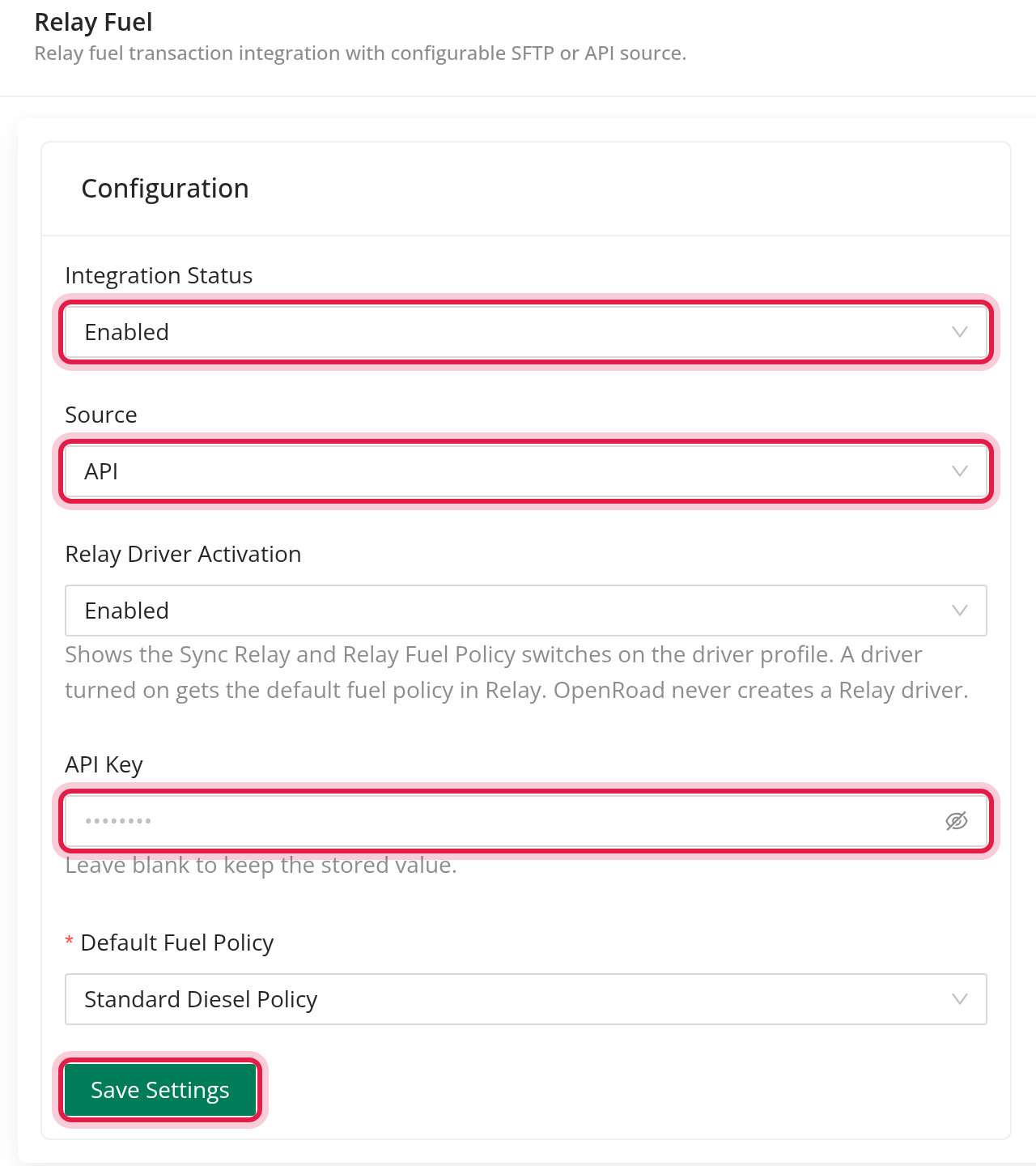
- In the Configuration card choose Source: API or SFTP.
- For SFTP fill in Host, Username and Password, then click Test Connection. You see "The connection is successful", or a reason such as "Invalid hostname", "Invalid username or password" or "Missing SFTP Host, SFTP User, SFTP Password". Once a password is saved it is never shown again; leave the field blank to keep it.
- For API enter the API Key. There is no Test Connection for the API source.
- Set Integration Status to Enabled. Imports run only while it is enabled.
- Click Save Settings.
Part 2: Turn on driver fuel access (optional, API source)
Set Relay Driver Activation to Enabled. This shows the Sync Relay and Relay Fuel Policy switches on every driver's profile. A driver turned on gets the default fuel policy in Relay.
- Enter and save the API Key first. API Key is required when driver activation is enabled.
- Choose the Default Fuel Policy. The list loads from Relay after the API key is saved ("Save the API key to load the fuel policies from Relay."). A policy is required when driver activation is enabled. If you type a new API key, choose the policy again.
- Click Save Settings.
Part 3: How transactions are imported
- OpenRoad checks Relay every 2 hours.
- With the API source it asks Relay for the transactions from the start of yesterday to the end of today.
- A transaction already imported is not added again. If Relay changed it, OpenRoad updates it.
- Each transaction is matched to a driver, a truck and a Relay fuel card, and shows the merchant, city, state, gallons and amounts.
- Transactions appear on Fuel Card Transactions with the card type Relay.
Part 4: Driver profile switches
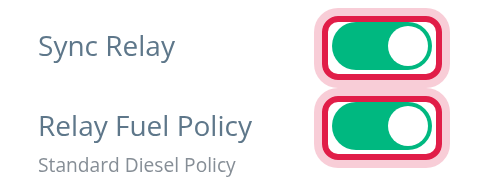
These appear on a driver's profile only when the source is API, an API key is saved and Relay Driver Activation is Enabled. Changing them needs permission to edit drivers.
- Sync Relay: turn it on to link the driver to the matching Relay driver. OpenRoad looks for the same first and last name together with the same phone or email, and otherwise for the same US phone number. Messages:
- "Driver linked to the matching Relay driver." - A red Not found if Relay has no matching driver. - Turning it off unlinks the driver in OpenRoad only: "Driver unlinked from Relay. Nothing changed in Relay."
- Relay Fuel Policy: shown once the driver is linked. Turn it on to give the driver fuel access: "Driver Relay account activated and fuel policy <name> assigned." Turn it off to remove it: "Fuel policy removed in Relay. The driver can no longer fuel with Relay." The line under the label shows the policy name, or "No fuel policy".
- If no default policy is chosen you see "Select a default fuel policy in the Relay Fuel settings first." - A problem reported by Relay shows as "Relay responded with: ..." in a Relay Fuel notification.
Frequently asked questions
Was this article helpful?
That’s Great!
Thank you for your feedback
Sorry! We couldn't be helpful
Thank you for your feedback
Feedback sent
We appreciate your effort and will try to fix the article