Connect Fleetrock to OpenRoad TMS and the preventive maintenance (PM) that Fleetrock schedules for your trucks and trailers shows up in OpenRoad. Dispatch sees which units have an Upcoming PM or an Expired PM in the Trucks and Trailers lists and on each unit's page, and you can stop expired units from being assigned or dispatched.
Who can do this: only users with the Superadmin role can open the Fleetrock page in Settings. Fleetrock is an extra feature. If you do not see Fleetrock under Settings → Integrations, contact OpenRoad Support at help@openroadtms.com.
Before you begin
- You need your own Fleetrock account. Ask Fleetrock for the Username and Token that OpenRoad should use.
- The Unit ID# of each truck and trailer in OpenRoad must be the same as the unit number in Fleetrock. OpenRoad matches units by that number.
- Only active trucks and trailers are followed.
- OpenRoad reads the Fleetrock items with these preventive maintenance codes: 040-993 for trucks and 040-996 for trailers, and 040-015 for the annual DOT inspection. For trailers, OpenRoad currently uses only units whose number starts with UL or UC that sit in a Fleetrock group containing UC. Units that do not fit are skipped without a message. If your Fleetrock uses other codes or trailer numbers, ask OpenRoad Support before you rely on it.
never post the Token in chat messages or tickets that other people can see.
Part 1: Turn the integration on
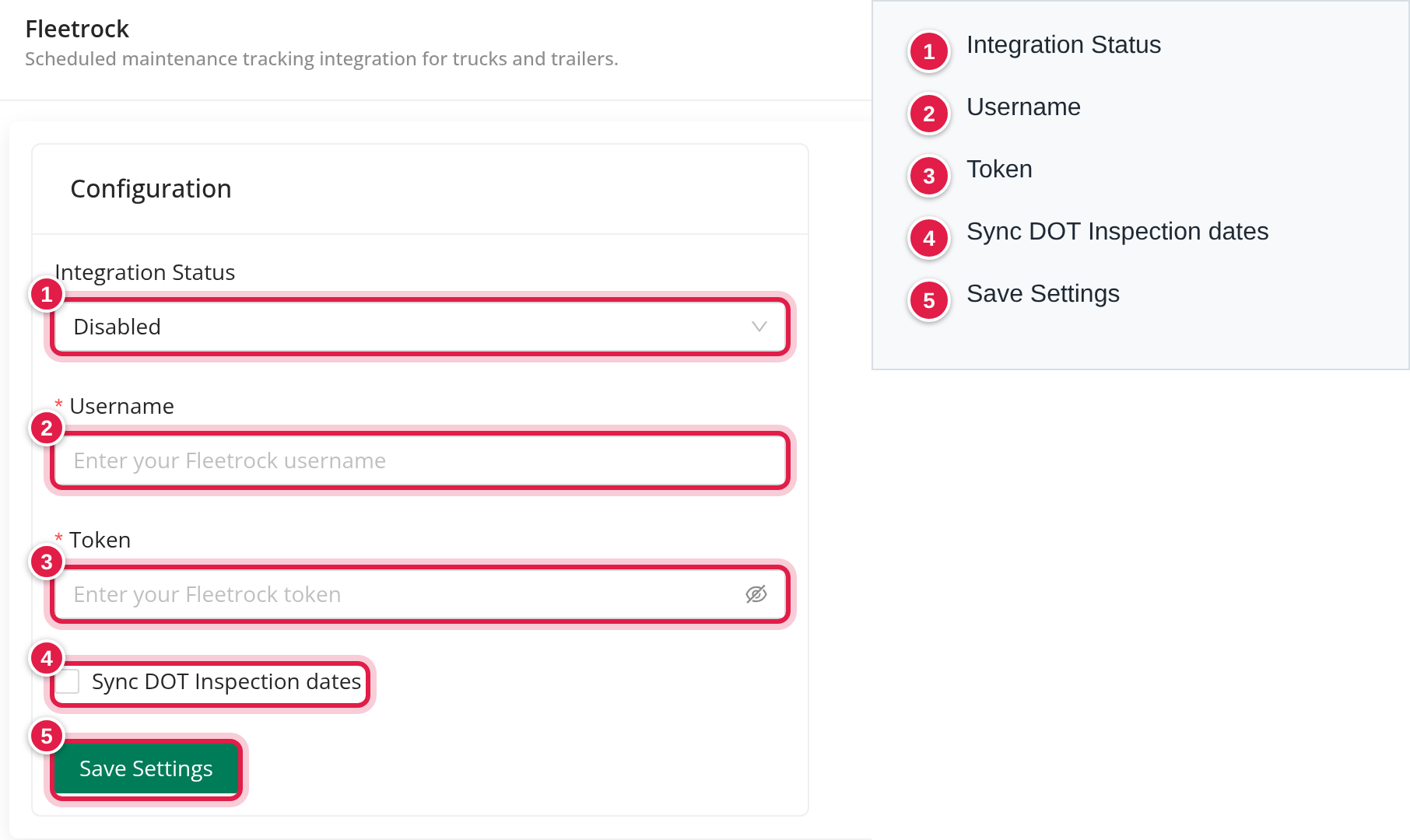
- Go to Settings → Integrations → Fleetrock.
- In the Configuration card, set Integration Status to Enabled.
- Enter your Fleetrock Username (required) and Token. The saved token is never shown again; leave the box blank to keep it.
- Tick Sync DOT Inspection dates if you want each truck's Annual DOT Inspection date to follow Fleetrock.
- Select Save Settings.
Part 2: Check each unit
On a truck's or trailer's page, the checkbox Fleetrock enabled (in the Permits and options card of a truck) says that OpenRoad follows the unit. It is switched on for every active unit when the feature is turned on for your account. A unit that becomes inactive loses it, and you can untick it for a unit you do not want to follow.
What you get
OpenRoad reads Fleetrock's list of scheduled preventive maintenance that is almost due or overdue and saves a PM due date on each matching unit.
- Trucks: the due date is the sooner of the days left and the miles left, counting about 500 miles a day.
- Trailers: the due date is the days left.
- DOT dates: with Sync DOT Inspection dates on, a truck's Annual DOT Inspection date is set from Fleetrock.
- When Fleetrock no longer lists a unit's PM, OpenRoad removes it from that unit.
Where you see it
- In the Trucks and Trailers lists, the columns PM Status (Expired PM, Upcoming PM or Unclear PM; you can filter by it), PM Days, PM Due Date and, for trucks, PM Miles. They are not in the default columns: add them with Columns.
- On the unit's page, a chip with the label, the days and, for trucks, the miles left: red when overdue, amber otherwise. With the DOT sync on, a truck also gets a chip for its Annual DOT Inspection when it is within 30 days or past.
- Unclear PM means OpenRoad has nothing from Fleetrock for the unit.

Effect on dispatch
Under Settings → Load settings, two options decide what an expired PM does: Allow to Assign Equipment with Expired PM and Allow to Dispatch Equipment with Expired PM. When assigning is not allowed, units with an Expired PM are left out of the truck and trailer pickers. When you dispatch, the dispatch warnings list "Truck <unit>: Expired PM" or "Trailer <unit>: Expired PM"; whether it stops the dispatch depends on the dispatch option.
Frequently asked questions
Was this article helpful?
That’s Great!
Thank you for your feedback
Sorry! We couldn't be helpful
Thank you for your feedback
Feedback sent
We appreciate your effort and will try to fix the article