Besides service logs, OpenRoad tracks the state of each truck and trailer with three flags, Needs Repair, OOS and Restricted Use. This article explains how to set the flags and where they show up. With the Fleetrock extra feature it also shows when preventive maintenance is due.
Before you begin
- To change a flag you need permission to edit the truck or trailer, see Settings → Access: set what each role and each user can see and do.
- The flags live on the truck's or trailer's Maintenance tab, which is part of Truck profile: all tabs (Overview, Files, Tolls, Fuel, Maintenance, Logs, GPS Logs, Stats and Accidents) and Trailer profile: all tabs (Overview, Files, Maintenance, Logs, GPS Logs, Accidents and Assignments).
The repair status card
Open a truck or trailer, then the Maintenance tab. At the top the card Repair status has three rows:
| Flag | Use it for |
|---|---|
| Needs Repair | The unit has a problem that must be fixed. |
| OOS | The unit is out of service. |
| Restricted Use | The unit may be used, with limits. |
Each row has a checkbox, the latest note and who wrote it and when.
- Tick the flag.
- Write the reason in the box that asks Why? (required).
- Confirm. To clear a flag, untick it; the note is optional.
Every change is saved in the vehicle's Notes. Active flags also show as tags in the header of the truck or trailer, and selecting a tag opens the Maintenance tab.
For a unit tracked by Samsara (and for Motive trucks) the card also shows Samsara gateway with its health and when it was last seen, the gateway Name and the Last known location.
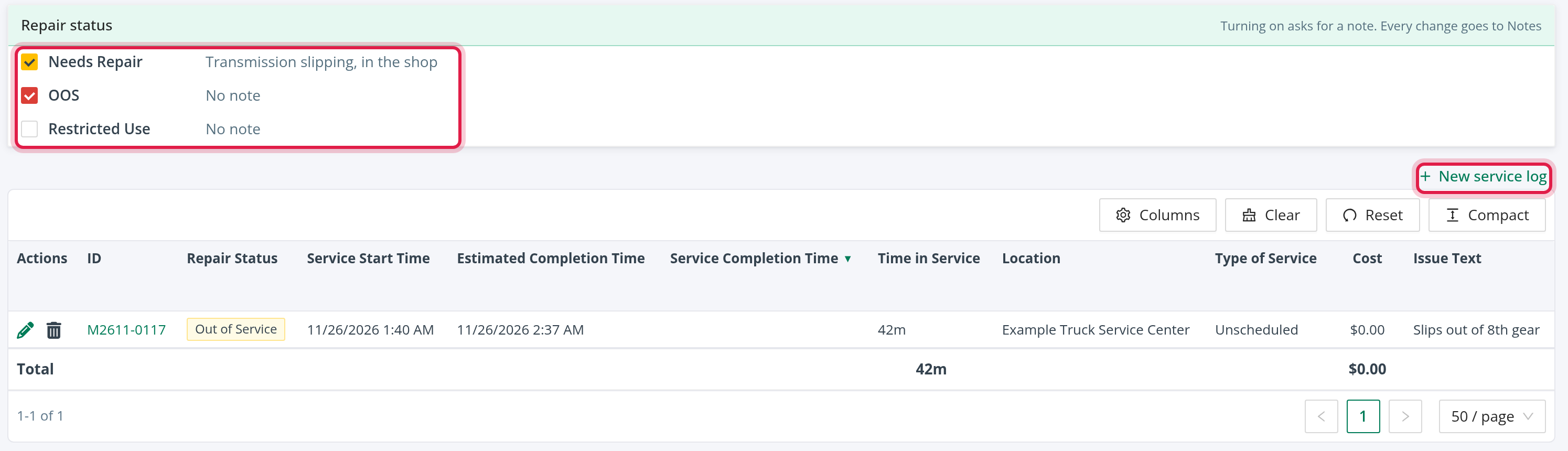
Under the card, the tab lists the unit's service logs, with New service log, see Maintenance → Service Logs: report an issue and follow it from repair to invoice.
A service log and the flags are separate. Reporting or finishing a service log does not set or clear Needs Repair or OOS; do that on this card.
Where the flags show
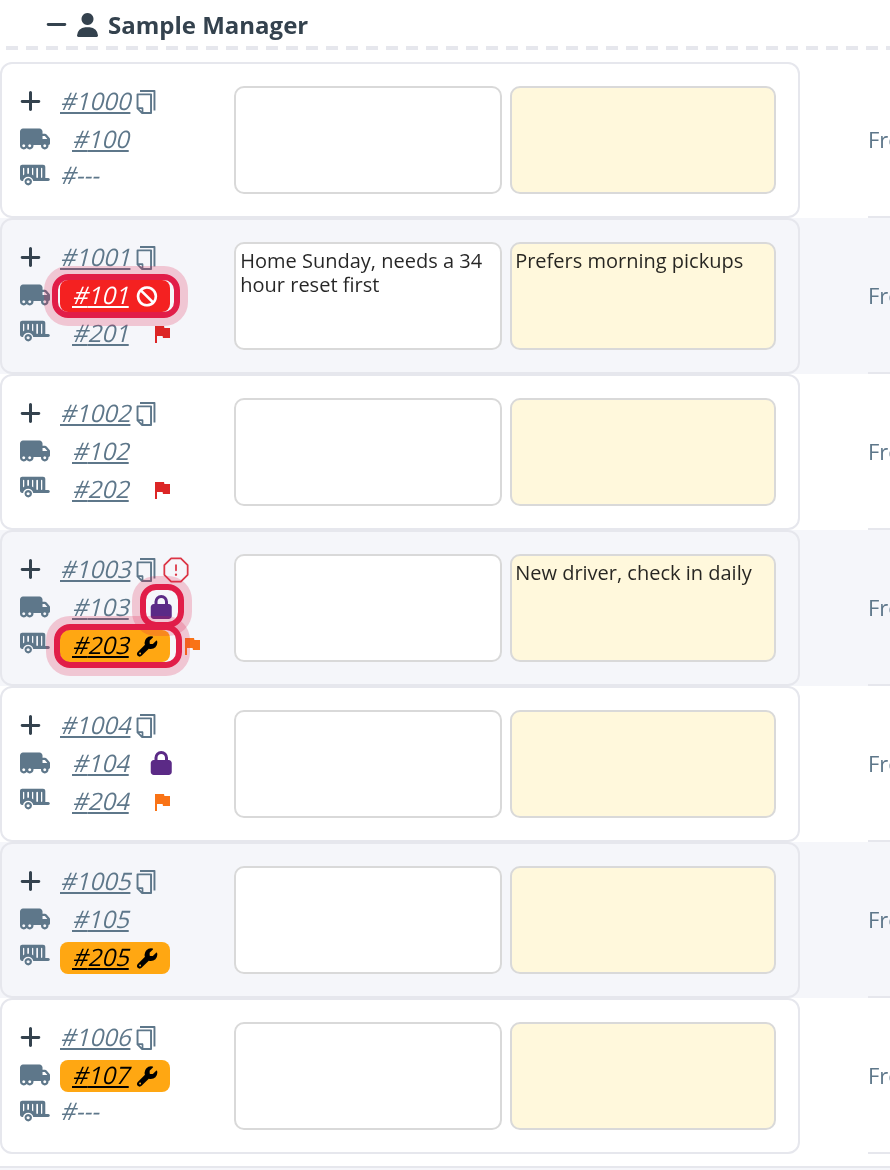
- Planner. In the timeline view, the truck and trailer numbers next to each driver show a badge: OOS, Needs Repair (a wrench) or Restricted Use (a lock). Hover to read the note. See Planner: drivers, loads, stops and off duty events on the timeline.
- Driver app. With Show Trailers maintenance status and notes on, a driver sees each trailer's Out of Service, Needs Repair and Restricted Use status and the note on the load. The setting is under Settings → Mobile app → General, see Driver app general settings: choose what drivers see and get.
Preventive maintenance with Fleetrock (EXTRA FEATURE)
If your account uses Fleetrock, OpenRoad also shows when each truck's and trailer's preventive maintenance is due: Upcoming PM, Expired PM or Unclear PM in the lists and on the unit's page, and you can stop units with an expired PM from being assigned or dispatched. Setup and details are in Fleetrock Integration: follow preventive maintenance due dates on your trucks and trailers.
FAQ
Was this article helpful?
That’s Great!
Thank you for your feedback
Sorry! We couldn't be helpful
Thank you for your feedback
Feedback sent
We appreciate your effort and will try to fix the article